Monday, 6 December 2010
Linux GUI system configuration
In order to configure linux by provided GUI, some commands are essential such as "system-cofig-firewall" will open Fedora's GUI firewall configuration window. There are also some other similar command. Using tab to investigate all of them!!!

Friday, 3 December 2010
Dive into more details of sfslite which is used by Chord official implementation
I decided to give up the usage of Openchord because it is quite difficult to use. I will back to Chord Official implementation.
:
One thing that is a little difficult to understand is in the Lesson 3: more than one callback are in the same procedure.
Line 27 and 28 can be merged into "delaycb (1, 0, wrap(docallback, wrap(hello)));"
I think I could understand it like this:
each wrap() will produce a callback version of a function (type of callback::ref
wrap(hello) provides a callback version of hello() method to function docallback( callcallback::ref ) ::ref)
wrap(docallback, wrap(hello)) provides a callback version of docallback(callback::ref) to delaycb and asks delaycb() to register docallback(callback::ref) in event queue.
========Bear in mind, the return value of wrap() is callback::ref=========
Here is the graphical expression of this mechanism:

Here I refresh some knowledge of sfslite and provide some useful web pages to understanding its code.
[Main Page]: http://www.okws.org/doku.php?id=sfslite
[Overview of sfslite]: http://www.okws.org/doku.php?id=sfslite:overview
[Some examples of usage]: http://www.okws.org/doku.php?id=sfslite:qhash
[async Tutorial]: http://pdos.csail.mit.edu/6.824-2004/async/
[Tips of using]: http://www.okws.org/doku.php?id=sfslite:tips
[Installation Guide]: http://www.okws.org/doku.php?id=sfslite:install
One thing that is a little difficult to understand is in the Lesson 3: more than one callback are in the same procedure.
Line 27 and 28 can be merged into "delaycb (1, 0, wrap(docallback, wrap(hello)));"
I think I could understand it like this:
each wrap() will produce a callback version of a function (type of callback
wrap(hello) provides a callback version of hello() method to function docallback( callcallback
wrap(docallback, wrap(hello)) provides a callback version of docallback(callback
========Bear in mind, the return value of wrap() is callback
Here is the graphical expression of this mechanism:

The usages of callback (callback::ref):
(1). it can be passed into a callback function like docallback as its parameter and be invoked in this callback function cb();
(2). it can be registered by a underlaying mechanism like delaycb.
Thursday, 2 December 2010
Problems suffered when I was usign SNMP
1. Set user pass-phrases problem:
It seems to be infeasible to change pass-phrases directly in configure file. Each time, after I changed pass-phrases in configure file, I can still not make it effect even I have already restart the snmpd.
(1). When I used snmpusm command to change password, I got a error message. This is because I was failed to assign a correct view to my current account.
(2). When I used the same command, I got a USM generic error in rpc242. I supposed that I used wrong syntax of snmpusm command. Here is this time's typing (running locally in rpc242):
snmpusm -v3 -l authPriv -u chenfu -a MD5 -A -x DES -X localhost passwd [ -Ca | -Cx ]
2. Running External Program:
Actually, I can use several different "things" to run external programs using snmp on remote host.
(1). "sh" is used to run shell script specially.
(2). "exec" can used to run almost all of programs. <>
========Both "sh" and "exec" should be used by occasions when only one line result is needed. They are under a specific OID. Before, it seems to be feasible to assign aa arbitrary OID to a specific program (It is your responsibility to make sure no conflicts happen.). But now, I have never completed it. Maybe new version of SNMP forbidden this unreliable feature.========
(3). "extend" is emerge under the situation where the manually assigning of an OID to a program is unsupported by "sh" and "exec".
(4). "pass" is used to deal with some manually assigned OID. I am not quite familiar with "pass". As far as I know, you are able to decide what operations to do when a specific OID is looked up.
My problem at the beginning is that I accidentally used the "exec" to run a simple script. I want to use a manually assigned OID to mark this entry. But it failed. When I turned to use "extend", it works quite well.
3. Usage of extend without assigned OID:
It seems to be infeasible to change pass-phrases directly in configure file. Each time, after I changed pass-phrases in configure file, I can still not make it effect even I have already restart the snmpd.
(1). When I used snmpusm command to change password, I got a error message. This is because I was failed to assign a correct view to my current account.
(2). When I used the same command, I got a USM generic error in rpc242. I supposed that I used wrong syntax of snmpusm command. Here is this time's typing (running locally in rpc242):
snmpusm -v3 -l authPriv -u chenfu -a MD5 -A
2. Running External Program:
Actually, I can use several different "things" to run external programs using snmp on remote host.
(1). "sh" is used to run shell script specially.
(2). "exec" can used to run almost all of programs. <
========Both "sh" and "exec" should be used by occasions when only one line result is needed. They are under a specific OID. Before, it seems to be feasible to assign aa arbitrary OID to a specific program (It is your responsibility to make sure no conflicts happen.). But now, I have never completed it. Maybe new version of SNMP forbidden this unreliable feature.========
(3). "extend" is emerge under the situation where the manually assigning of an OID to a program is unsupported by "sh" and "exec".
(4). "pass" is used to deal with some manually assigned OID. I am not quite familiar with "pass". As far as I know, you are able to decide what operations to do when a specific OID is looked up.
My problem at the beginning is that I accidentally used the "exec" to run a simple script. I want to use a manually assigned OID to mark this entry. But it failed. When I turned to use "extend", it works quite well.
3. Usage of extend without assigned OID:
- On the remote server configure
dateextension in/etc/snmp/snmpd.conf. Simply add this single line at the end of the config file and reload snmpd:extend datecheck /bin/date
- From any client that has allowed SNMP access to the server query the datecheck with:
~$ snmpwalk -v2c -c public remote.server NET-SNMP-EXTEND-MIB::nsExtendOutputFull
NET-SNMP-EXTEND-MIB::nsExtendOutputFull."datecheck" = STRING: Wed Oct 18 00:01:44 NZDT 2006
That's about it. Easy way to run programs and scripts remotely, isn't it?
Tuesday, 30 November 2010
Application of Double pointer in C
1. 作为参数, 用于函数改写指针参数。

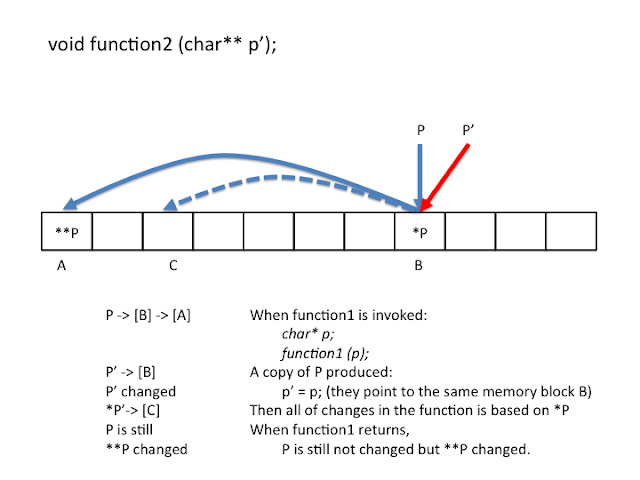
2. 用来组建多维数组。
具体参见: http://landerchan.blogspot.com/2008/11/dynamically-allocating-multidimensional.html


具体参见: http://landerchan.blogspot.com/2008/11/dynamically-allocating-multidimensional.html
Tuesday, 23 November 2010
Linkage error for Linux package installation
Troubleshooting:cannot open shared object file: No such file or directory
From MythTV
This advice applies to those people running an SVN version of myth, not the tarball or packaged versions.If you see this:
/usr/local/bin/mythbackend: error while loading shared libraries:
libmyth-0.20.so.0.20.0: cannot open shared object file: No such file or directory
after updating myth, then you probably need to do the following:
sudo locate -u
locate libmyth-0.20.so.0.20.0
That will return something like
/home/mythtv/compile/svn/mythtv/libs/libmyth/libmyth-0.20.so.0.20.0
/usr/local/lib/libmyth-0.20.so.0.20.0
The first one (for me) was the path to the folder I compiled MythTV in. The 2nd line is the installed location of libmyth. I need to add the folder its in (in this case /usr/local/lib/). You need to append that to the end of /etc/ld.so.conf. For me, I would now execute as root
echo "/usr/local/lib" >> /etc/ld.so.conf
/sbin/ldconfig
If that doesn't work try make distclean, then configure, then make and make install.
If that all fails, try a fresh checkout of the svn repository, after deleting or moving your current checkout:
svn co http://svn.mythtv.org/svn/trunk/mythtv
svn co http://svn.mythtv.org/svn/trunk/mythplugins
svn co http://svn.mythtv.org/svn/trunk/myththemes
Then go through the usual build process (configure && make && make install).
Reference: http://www.mythtv.org/wiki/Troubleshooting:cannot_open_shared_object_file:_No_such_file_or_directory
The meaning of printf(_("Some Strings"))
This is related international programming and GNU i18n. _() can be identified as the Macro of gettext() function. More details can be found here:
http://en.wikipedia.org/wiki/GNU_gettext
http://en.wikipedia.org/wiki/GNU_gettext
Monday, 8 November 2010
Install wireshark on Fedora 11
1, yum install wireshark. this is quite straight forward.
2, yum install wireshark-gnome. This this necessary!!!
As for the installation on MAC OS X, this is still on working or I would rather give up. I don't want to make my MAC bulky.
2, yum install wireshark-gnome. This this necessary!!!
As for the installation on MAC OS X, this is still on working or I would rather give up. I don't want to make my MAC bulky.
Subscribe to:
Posts (Atom)