Here, some useful tips or unknowns of C/C++ programming are listed for further reference:
1. Stand alone curly brackets in code.
Sometimes a pair of curly brackets can be found in a C/C++ code file. It seems to be useless:
Configurator::only ().dump();
{
strbuf x = strbuf ("starting: ");
for (int i = 0; i < argc; i++) {
x << argv[i] << " ";
}
x << "\n";
info << x;
}
Here, the curly brackets is not necessarily to exist. However, they have their meanings from two different point of views: Scope perspective and Legacy perspective.
In scope perspective, the codes in the pair of curly brackets is in a new sub scope.
In legacy perspective, the legacy C standard needs variable declarations to be in the very front of the code. The curly brackets are able to make a new "beginning".
I am working on a C++ project. So the original coder considered in a scope perspective.
Showing posts with label Programming. Show all posts
Showing posts with label Programming. Show all posts
Saturday, 23 March 2013

Sunday, 21 October 2012
Thread-local storage
Thread-local storage (TLS) is a programming method that is used to make static and global variables be local to a thread. The '"errno" is a canonical example of TLS method. Actually, a "errno" should be a static variable used by all functions to determine the error status. However, in each thread of a running process, there should be a separated one in order to prevent the infection from other threads in the same process.
The comparing method to achieve the similar function with the TLS is the thread lock for a static or global variable. However, a carelessness of requiring the lock in any threads in the process would affect other threads.
The comparing method to achieve the similar function with the TLS is the thread lock for a static or global variable. However, a carelessness of requiring the lock in any threads in the process would affect other threads.
Monday, 16 January 2012
Terminal Colors
Here's a list of different colors:
30 black foreground
31 red foreground
32 green foreground
33 brown foreground
34 blue foreground
35 magenta (purple) foreground
36 cyan (light blue) foreground
37 gray foreground
40 black background
41 red background
42 green background
43 brown background
44 blue background
45 magenta background
46 cyan background
47 white background
Commands can also be combined using a semicolon, like so:
Finally here is a list of other neat commands that go at the end (where the '0' is):
0 reset all attributes to their defaults
1 set bold
5 set blink
7 set reverse video
22 set normal intensity
25 blink off
27 reverse video off
=====================================================
Another one:
\033[22;30m - black
\033[22;31m - red
\033[22;32m - green
\033[22;33m - brown
\033[22;34m - blue
\033[22;35m - magenta
\033[22;36m - cyan
\033[22;37m - gray
\033[01;30m - dark gray
\033[01;31m - light red
\033[01;32m - light green
\033[01;33m - yellow
\033[01;34m - light blue
\033[01;35m - light magenta
\033[01;36m - light cyan
\033[01;37m - white
30 black foreground
31 red foreground
32 green foreground
33 brown foreground
34 blue foreground
35 magenta (purple) foreground
36 cyan (light blue) foreground
37 gray foreground
40 black background
41 red background
42 green background
43 brown background
44 blue background
45 magenta background
46 cyan background
47 white background
Commands can also be combined using a semicolon, like so:
printf("\033[45;37mGrey on purple.\033[0m");Finally here is a list of other neat commands that go at the end (where the '0' is):
0 reset all attributes to their defaults
1 set bold
5 set blink
7 set reverse video
22 set normal intensity
25 blink off
27 reverse video off
=====================================================
Another one:
\033[22;30m - black
\033[22;31m - red
\033[22;32m - green
\033[22;33m - brown
\033[22;34m - blue
\033[22;35m - magenta
\033[22;36m - cyan
\033[22;37m - gray
\033[01;30m - dark gray
\033[01;31m - light red
\033[01;32m - light green
\033[01;33m - yellow
\033[01;34m - light blue
\033[01;35m - light magenta
\033[01;36m - light cyan
\033[01;37m - white
Saturday, 19 February 2011
What if you encounter an error message of "out of heap" in Java?
At this time, you need to:
(1). check the program and find out any possibility to free the unnecessary resource.
(2). increase your heap size to achieve more memory allocated to java.
Here I only care about the later one:
(1). check the program and find out any possibility to free the unnecessary resource.
(2). increase your heap size to achieve more memory allocated to java.
Here I only care about the later one:
java -Xms<initial heap size> -Xmx<maximum heap size>
Defaults are:
java -Xms32m -Xmx128mUsage of u_int32_t and size_t
Actually, the usage of these kinds of types confused me for a quite long time, because I really don't know what's the differences between these types and the C's primitive types such as 'int'?
The C's primitive types such as 'long', 'int' are machine dependent, which means different types system probably has different definition of long and int. For example, in old x86 (486), 'int' may be defined by 2 bytes. However, it is 4 bytes in most machines nowadays. In this case, 'u_int32_t' or 'int32_t' is invented to be a system independent type. In fedora, they are defined in file '/usr/include/sys/types.h', 'u_int32_t' is only possible to be a 'int' type with 32bit (4 bytes). This will provide the program with being portable.
The C's primitive types such as 'long', 'int' are machine dependent, which means different types system probably has different definition of long and int. For example, in old x86 (486), 'int' may be defined by 2 bytes. However, it is 4 bytes in most machines nowadays. In this case, 'u_int32_t' or 'int32_t' is invented to be a system independent type. In fedora, they are defined in file '/usr/include/sys/types.h', 'u_int32_t' is only possible to be a 'int' type with 32bit (4 bytes). This will provide the program with being portable.
Wednesday, 15 December 2010
Discussion on Array size, String length.
This is an revision concentrating two functions, sizeof() and strlen().
There are several manners for a programmer to define a string in C/C++ programs.
In order to initialize them, the following steps work.
INSTEAD: strcpy(string, "This is what we want to defined");
char *string;
In the following part, I give some different defined strings in my code. The print out is the results of two functions, sizeof() and strlen.
Here is the code:
The print out is:
Another aspect of the difference between strlen() and sizeof() is that strlen needs a function call to determine the string length, however, sizeof is able to give the length during the compile process. The buffer's example demonstrates this argument quite well. But, the prerequisite is that the sizeof() is able to give rather correct string length. The string should be defined and initialized as buffer example dose. In this case, bear in mind that sizeof will include the '\0' but strlent will not.
Hopefully, this makes clear of the usage of string.
There are several manners for a programmer to define a string in C/C++ programs.
- char pointer: char *string;
- char array: char string[100];
In order to initialize them, the following steps work.
- define string immediately if we know what we want to define.
char string[] = "This is what we want to defined";
char *string = "This is what we want to defined";
- define string first and then give the specific number afterwards.
char string[100];
string = "This is what we want to defined";
CAUTION:<<This is not allowed in C++, can not assign an array to another array>>INSTEAD: strcpy(string, "This is what we want to defined");
char *string;
string = "This is what we want to defined";
In the following part, I give some different defined strings in my code. The print out is the results of two functions, sizeof() and strlen.
Here is the code:
char *test;
char test2[100];
test = "This is what we want to define";
char buffer []= "This is what we want to define";
strcpy(test2, "This is what we want to define");
std::cout << "test sizeof " << sizeof(test) << "\n";
std::cout << "test strlen " << strlen(test) << "\n";
std::cout << "buffer sizeof " << sizeof(buffer) << "\n";
std::cout << "buffer strlen " << strlen(buffer) << "\n";
std::cout << "test2 sizeof " << sizeof (test2) << "\n";
std::cout << "test2 strlen " << strlen(test2) << "\n";
The print out is:
test sizeof 4
test strlen 30
buffer sizeof 31
buffer strlen 30
test2 sizeof 100
test2 strlen 30
Another aspect of the difference between strlen() and sizeof() is that strlen needs a function call to determine the string length, however, sizeof is able to give the length during the compile process. The buffer's example demonstrates this argument quite well. But, the prerequisite is that the sizeof() is able to give rather correct string length. The string should be defined and initialized as buffer example dose. In this case, bear in mind that sizeof will include the '\0' but strlent will not.
Hopefully, this makes clear of the usage of string.
Tuesday, 7 December 2010
Parsing Long Options
Find this topic in DOCUMENT of GNU C library: libc
http://www.gnu.org/software/libc/manual/ From page 633
Here I conclude some useful tips:
== return values of getopt():
- successful
- a character (the option name without argument)
- a character (the option name), a pointer to char (char *optarg: argument)
- failed
- '?' (not included in options OR missing argument) (int optopt keeps the character)
- -1 complete
== return values of getopt_long ():
- successful
- short_options
- (same with getopt())
- long_options
- content of val (flag = NULL) (Tips, put corresponding short option char in val)
- 0 (flag != NULL, put content of val into *flag)
- (same with above two) (with argument are stored in optarg)
- failed
- (same with getopt())
- -1 complete
PS: indexptr record the index of the options in array of struct option.
Tuesday, 30 November 2010
Application of Double pointer in C
1. 作为参数, 用于函数改写指针参数。

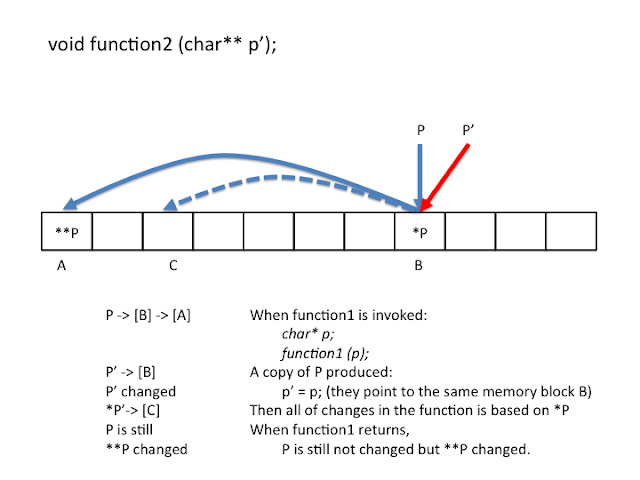
2. 用来组建多维数组。
具体参见: http://landerchan.blogspot.com/2008/11/dynamically-allocating-multidimensional.html


具体参见: http://landerchan.blogspot.com/2008/11/dynamically-allocating-multidimensional.html
Tuesday, 23 November 2010
The meaning of printf(_("Some Strings"))
This is related international programming and GNU i18n. _() can be identified as the Macro of gettext() function. More details can be found here:
http://en.wikipedia.org/wiki/GNU_gettext
http://en.wikipedia.org/wiki/GNU_gettext
Wednesday, 18 August 2010
Shell Script
When I was using Bash Shell script to extract the available free space in the hard driver, there are several things that are worth to be noticed.
1. The importance to declare variables.
There is a segment fault when I was trying to invoke the C program from the script if the arguments that are forwarded to the C program is not declared at the beginning of the script. Next step should be to make clear what is the meaning of the parameters when the declaration was made. Those are called "variable attributes" (Burth, 73)
--------------------------------------------------------------------------------------------------
Just found that the arguments can only be declared to be read-only......
If I did not use the declaration, there will be a segment fault. However, today I confirm that if I lost a argument of shell script such as the path of the experiment it will also lead to a segment fault!
--------------------------------------------------------------------------------------------------
I just found the main problem within this issue. The structure has problem:
df | while read content
do
echo ${content}
temp=${content}
done
echo ${content}
echo ${temp}
The situation is the same with the following snippet of code:
df | read content
echo ${content}
It can not read anything after "df".
1. The importance to declare variables.
There is a segment fault when I was trying to invoke the C program from the script if the arguments that are forwarded to the C program is not declared at the beginning of the script. Next step should be to make clear what is the meaning of the parameters when the declaration was made. Those are called "variable attributes" (Burth, 73)
--------------------------------------------------------------------------------------------------
Just found that the arguments can only be declared to be read-only......
If I did not use the declaration, there will be a segment fault. However, today I confirm that if I lost a argument of shell script such as the path of the experiment it will also lead to a segment fault!
--------------------------------------------------------------------------------------------------
I just found the main problem within this issue. The structure has problem:
df | while read content
do
echo ${content}
temp=${content}
done
echo ${content}
echo ${temp}
The situation is the same with the following snippet of code:
df | read content
echo ${content}
It can not read anything after "df".
Tuesday, 10 August 2010
C++ Programming Tips...
Converting from a String to a integer can be achieved by a build-in function atoi() which can be found from the manual page. However the conversion from a integer to a String can not follow the similar method due to the itoa() function is not a build-in function. It is a compiler dependent method. In C++, there is a handy method:
#include
int number;
std::ostringstream sin;
sin << number;
std::string aString= sin.str();
char* c_type_string = aString.c_str();
#include
int number;
std::ostringstream sin;
sin << number;
std::string aString= sin.str();
char* c_type_string = aString.c_str();
Subscribe to:
Posts (Atom)